Mobile portrait studio: BeautyPlus-Selfie Photo Editor review
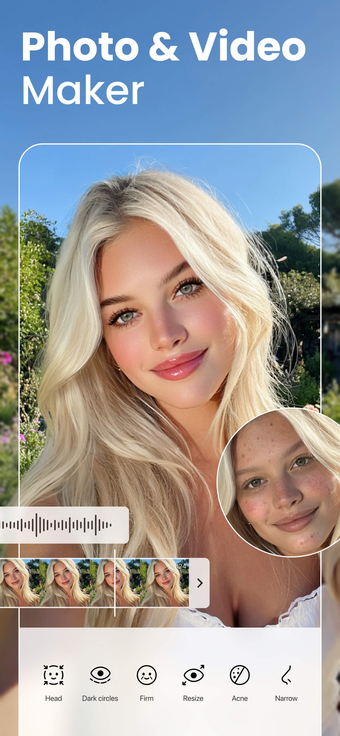
BeautyPlus-Selfie Photo Editor, from PIXOCIAL TECHNOLOGY SINGAPORE PTE. LTD., edits mobile portraits with AI-based retouching. It combines a selfie camera, a photo editor, and a video editor, offering AI Auto-Retouch, object removal, background replacement, and image upscaling in a single workflow. Also included are virtual makeup, body reshaping, 300+ fonts, stickers, AR filters, and an asset library for quick creative edits. You as a social creator or selfie enthusiast gain fast, polished results without desktop software complexity.
What creative outcomes does the app target?
You use this tool to move from quick captures to polished portraits and playful avatars. The app positions itself as a mobile-first studio that transforms selfies and short videos into finished social assets, and it lists AI avatars and anime-style filters among its outputs. That focus makes it practical when you need portrait-centric results on a device rather than a multi-step desktop pipeline.
What AI editing can you expect?
AI tools drive the core edits: one-tap Auto-Retouch for skin and facial refinement, an AI Remover to delete unwanted people or objects, and an AI Image Enhancer that upscales and restores blurry photos. These functions use intelligent filling and enhancement so you can repair older photos or tidy a crowded background with minimal manual masking.
How does the workflow fit everyday social creators?
The app bundles creative assets and quick controls aimed at fast output: virtual makeup and contouring, body reshaping tools, over 300 designer fonts, and stickers plus AR filters. You can apply similar retouch effects to video clips inside the same mobile package, which reduces context switching and keeps a short edit-to-post loop for feeds and stories.
Is it better for beginners or professionals?
The app matches casual creators and hobbyists more closely than layer-heavy studios. It offers an open tier for basic editing and an account-gated tier for advanced AI tools and premium assets, so you choose how deep to go. Availability on iPhone, iPad and recent Mac hardware keeps it accessible, and app-store ratings note ease of use and effective AI as strengths.
A practical entry point for mobile portrait creators
You get a focused, mobile-first tool that makes portrait polishing and playful avatars approachable. It suits social creators who prefer quick, polished results on-device; those needing precise, studio-style compositing or exhaustive manual controls should look to dedicated desktop suites instead.
What People Are Saying
- The Good
Fans call it their favorite photo editor, praising versatile tools, a useful free tier and the option to preview edits before saving. Some say it beats paid editing apps they used before.
- The Bad
Many complaints center on billing, with people reporting free trials that became paid plans and subscriptions that renewed without clear notice. Several say charges continued after cancelling and refunds were hard to get.
- The Bottom Line
A solid pick for casual selfie and portrait editing, but anyone starting a trial should note the renewal date and cancel through their store account well ahead of it.